I started this year excited to continue working on CARCAS, an archaeology project about displaying 3D scans of animal bones. I am now graduating, and looking back on the work I have done, I am incredibly proud of the technologies I have learned, the technical documentation I have written, and my growth as a team leader.
This winter, with the addition of the Alpaca skeleton, it became clear that the current systems in place for storing the CARCAS models on the web server were no longer sustainable. There were too many big files, and the method for storing them took up too much additional space.
The transition took a lot of time and effort. I started by researching different tools, eventually settling on Datalad since it has clear, beginner friendly documentation and it can play nice with the web server that CARCAS already used. Figuring out the correct configuration tested my patience. My early attempts at making the models downloadable caused a nasty little bug that prevented the correct method from working. I tried troubleshooting on the Datalad forum, but even experienced users couldn’t figure out how to fix it. I finally started over from scratch, and everything worked like a charm.
Dealing with this bug, and solving it by starting from scratch, reinforced that failing is part of the learning process. The second time around, everything went a lot smoother because I understood how all the pieces fit together. And, I was able to write down what I was doing because I wasn’t overwhelmed with learning new things.
Once the new system was in place, my supervisors emphasized that I needed to write instructions so that future DHAs could learn how to use it. After all, a system for collaboration and backups is useless if no one knows how to use it. I thought this would be relatively straightforward. After all, I knew how to use the system and I didn’t have comprehensive notes of my own.
I discovered that I had learned a lot through experimenting with Datalad and the new CARCAS system, and that it was not immediately obvious to others what to do. I collaborated with Noah Zameer Lee, another DHA. He had completed the Datalad tutorial like I had, but he had been working on other projects while I set up the new system. When I was sitting right next to him, I could guide him through using the system, but there was a lot that was not clear, even to someone familiar with the software.
I wrote a few different sets of instructions and documentation for different use cases. I focused especially on first time set up, routine tasks, and where to learn more to deeply understand the tools. These were the areas that overwhelmed me when I first started working on CARCAS. First time set up and routine tasks look easy when you have done them before, but when you are just getting started, there’s nothing for your brain to latch on to.
Also, towards the end of making it easy for a future DHA to get started, I hosted a recorded Zoom meeting with my supervisors and coworkers where I demonstrated what it looks like to follow my instructions and start making changes. I deliberately chose to record this video from a new account on my computer so that I would have to show the set up.
Recording this walk through was also incredibly helpful for me. I discovered tasks that I had forgotten to write about because they had become second nature, and I discovered sections of my documentation that were too cluttered and difficult to reference. Just as revising is helpful when writing an essay or a blog post, I learned that it is also an essential step of writing technical documentation.
Working on CARCAS’s back-end transition has taught me a lot about working as a team leader. I made impactful decisions, like when I decided that Datalad was the best tool for CARCAS. I had to reassess and choose whether or not to stand by my decisions, like when I spent weeks looking for the bug in my first attempt at using Datalad. I needed strong communication throughout the whole process. I explained to my supervisors what I was doing and why, without getting into the technical weeds. I taught Noah how to use the system I set up, and I helped him figure out how it fit in with his piece of the project. I created documentation and a video for future DHAs, in hopes that I could pass on my knowledge.
I have had a wonderful time working on CARCAS this year. As I go off into the world after Carleton, I can’t wait to look back and see how CARCAS keeps on growing!
As a Digital Humanities Associate (DHA) this year, my work on the Mapping Japan project has been incredibly rewarding. This exciting initiative is a collaborative effort between multiple departments and the Gould Library at Carleton College, led by Professor Asuka Sango from the Religion and Asian Studies departments. Initially developed during the Institute for Liberal Arts Digital Scholarship (iLiADS) last summer at Davidson College, our goal is to digitize Carleton’s rich Japanese map collections and build an Omeka S site to host them. This site and the sample items will serve as valuable resources for a course (ASST 285: Mapping Japan, the Real and the Imagined) next spring.
Our Collections
Our collections include Gaihōzu maps, produced by Imperial Japan in the late 19th and early 20th centuries, which were captured by Allied forces at the end of World War II and distributed to various libraries in the U.S. Carleton has approximately 1,280 sheets of Gaihōzu. There are also Naihōzu maps, which are maps of Japan and its overseas territories, also produced by Imperial Japan and captured by Allied forces. We are currently organizing this collection, which likely includes several hundred sheets. Additionally, our collection holds 70 sheets of maps of Japan created by the Office of Strategic Services (former CIA) during and shortly after World War II, as well as 8 sheets of premodern Japanese maps, with plans to acquire more.
My Role in the Project
My contributions to the Mapping Japan project have been multifaceted.
Metadata Template Creation
We decided to create two separate Omeka sites: one for general purposes and another for student exhibits next year. For our metadata template, we chose Dublin Core due to its widespread acceptance and standardization in metadata practices. Key fields in our template include titles (in English and Japanese), descriptions, call number, creators and contributors, genres, dates, and places shown.
Creating the metadata template was a thoughtful process that involved iterative discussions to identify the most critical properties of the maps. We examined how institutions like the Stanford University Libraries present their Gaihōzu maps and incorporated feedback from Professor Sango on how the template could serve as a gradable assignment in her upcoming class. We debated details such as whether to record B&W/color distinctions and which field to use for physical dimensions. Additionally, we considered the best media for showcasing the digitized maps, evaluating options such as IIIF, the default Omeka settings, or the published Google Drive images.
Creating Sample Site Structures and Wireframes
Designing the website structure was another fascinating part of my work. We analyzed exemplary Omeka S sites, especially those showcasing maps, to learn from their navigation bars, search functions, and more. As a statistics major, I was particularly interested in the data visualization aspect– how to best present all types of data, whether textual, visual, or numerical, in the most accessible way. Collaborating with my colleague, DHA Tonushree, we created engaging slides and pitches for the entire team.
Current Landing Page
Developing the Timeline Showcase
Another significant task was creating a sample timeline object to embed on the site. This timeline showcases maps from different periods, from the Meiji era to post-World War II. After exploring various options, we decided to use TimelineJS, which allows us to customize and embed images and descriptions seamlessly. The timeline offers a compelling historical perspective, and we aim to include a wide range of maps beyond just military and topographical ones, such as those depicting spring areas in Japan.
Sample Timeline
Writing Instructions for Students
I also authored instructions for students who will create items and exhibits for the site next year. This involved finding examples of how to upload images, appropriate citation formats, and what to include in descriptions. This experience required continuous learning, particularly about different types of rights statements and the reuse of historical archives and images.
Instructions for the “Creator/Agency” Metadata Field
Why This Project Matters
The Mapping Japan project is more than just an academic exercise; it is an effort to diversify Carleton’s curriculum and highlight non-Western items in our library’s Special Collections. By digitizing, annotating, and publicizing these Japanese maps, we aim to create a rich, accessible online exhibit that will serve both current and future students. This project not only preserves historical artifacts but also provides valuable educational resources and opportunities for hands-on digital humanities work.
Conclusion
The Mapping Japan project has been a highlight of my year as a DHA. It has offered me the chance to collaborate with talented individuals, learn new skills, and contribute to a meaningful initiative. As we move forward, I am excited to see how this project will continue to grow and impact both the Carleton community and the broader field of digital humanities.
Hello! I joined the DHAs in January of this year and over the past 5 months, I have learned so much and gotten much-needed experience working in a professional setting where more was expected of me. This has been a great experience and I am glad I got to do it with such nice people. There were a ton of things I learned with the DHAs and a lot I know I can grow from.
Firstly, learning how to communicate formally and do that well. Never in my prior work experiences did I have to connect with professors and other students. While it may be intuitive for others, I found it challenging to send formal emails and also follow up with them and keep communication strong. I got to teach a class of mostly seniors WordPress when I had only started learning how to use it a few months prior. I was extremely nervous, and although I personally thought I could have done better, according to Em I did a good job. I also learned how to communicate with my coworkers too. Throughout my time here, I worked on projects mainly with other DHAs or on projects overseen by my supervisors. I learned to ask questions whenever I got stuck instead of trying to overcome it stubbornly and to continuously check in with my team members – particularly when it came to working on the CARCAS project. The CARCAS project was what I spent most of my time working on with Erin and centered around uploading and maintaining 3D scans of various carcasses on the CARCAS website.
Screenshot of the poster-script I wrote for CARCAS using Node.js and Puppeteer running locally.
Another skill I got from working with the DHAs was how to learn new technologies quickly. Git, Conda Environments, Node Scripts, Puppeteer, DataLad, Model-Viewer and WordPress are just some of the technologies I had to learn on the fly while working with the DHAs. At first, I had a lot of trouble reading documentation, and trying to learn so many new technologies and applying them on such large projects like CARCAS. However, I got much better at it, and in my other classes like CS 347, I start to realize that part of being a great Computer Scientist is being able to learn new technologies quickly – as technology is always advancing. The skill of learning new technologies is definitely not something I have mastered yet – particularly with reading large volumes of documentation – but is something I definitely can say that I got better at; and being with the DHAs definitely made me realize the importance of it.
Finally, another skill that I can say I learned is how to manage time effectively. The work with the DHAs was very independent. We would choose a task and it was up to us to take the necessary steps to get the task done. Em or Austin never would remind me to do something at a certain time, it would all be on me. This requires a lot of self-control and responsibility to make sure I send the emails to the right people on time or take the necessary steps to get the poster script on the server by a certain date. I also had to balence working with the DHAs while taking up a lot of high level classes this term. I had to learn to say I was too busy when offered a task – which was something I used to find difficult – especially at the start of my time here where I would accept any and all tasks presented to me.
Unfortunately, with the swim season starting again next fall and me taking even more difficult classes next term, I will be making the apt decision to step back from the DHAs for the time being as I focus on my academics and the swim season. Being a DHA has been a wonderful experience that I will forever be grateful for as my first comprehensive work experience and I look forward to working with the DHAs in the future.
In previous blogs, I have discussed how Gale Digital Scholar Lab (GDSL) can be utilized to create datasets and subsequently conduct various analyses on them. Recently, a comparable online ‘data lab’ has emerged as a contender: JSTOR’s Constellate. Much like GDSL, Constellate is an online platform, developed by JSTOR, designed to support digital scholarship by providing tools for text and data mining across a broad range of academic content. Researchers, data scientists, and advanced students can utilize Constellate to analyze and explore diverse datasets, conduct advanced text analysis, and gain insights from academic texts. The platform offers a suite of tools for tasks like clustering, n-grams, and topic modeling, and integrates with Jupyter Notebooks for users who prefer coding in Python or R.
In this blog, I intend to explore the distinctions between Constellate and GDSL, highlighting how each platform may be better suited for different purposes. I will assess them based on various criteria, including the quality of the database, access to full-text content, user-friendliness, and flexibility.
1. Quality of Database:
Both tools provide researchers with access to a database containing a wealth of materials. In the case of GDSL, this database comprises a diverse array of, in many cases, public domain content, ranging from historical newspapers and magazines to flyers and other ephemera. It is worth noting that the Gale database includes more academic sources alongside its ‘non-academic materials’. This incorporation of academic works into its database creates a blend of both academic and non-academic materials. This rich variety of content makes GDSL’s database an extensive resource for researchers seeking a broad spectrum of information for their analyses and studies.
Constellate employs the formidable database of JSTOR, esteemed for its comprehensive coverage of academic journals and papers across numerous disciplines, with particular strength in the humanities. This expansive repository offers researchers access to a wealth of scholarly literature, providing authoritative sources and profound insights for academic inquiries in fields ranging from history and literature to sociology and anthropology. While Constellate’s focus on academic content may mean it features fewer non-academic sources compared to GDSL, its emphasis on scholarly rigor and depth of coverage makes it an indispensable tool for researchers seeking to explore and analyze academic research, especially in the humanities.
Researchers seeking a combination of academic and non-academic content can benefit from using Gale Digital Scholar Lab (GDSL), which provides access to a diverse range of materials including historical newspapers, magazines, and other non-academic sources alongside academic works. On the other hand, for those focused solely on scholarly content, Constellate, with its extensive collection of academic journals and papers sourced from JSTOR, serves as an excellent resource. By understanding their specific research needs and preferences, researchers can choose the platform that best aligns with their objectives and maximizes the efficiency and effectiveness of their research endeavors.
2. Full-text Access:
While both Gale Digital Scholar Lab (GDSL) and Constellate offer general access to their respective databases, a notable distinction lies in their policies regarding full-text access. GDSL grants users unrestricted access to the full text of the content within its database, enabling researchers to delve deeply into the materials and conduct thorough analyses without constraints. This unrestricted access is particularly advantageous for users who require comprehensive access to the entirety of the available dataset for their research endeavors.
In contrast, Constellate adopts a different approach regarding full-text access. While users have general access to the datasets generated by Constellate, including metadata and select text snippets, full access to the complete text may not be readily available. Instead, researchers interested in accessing the full text of the datasets need to submit a special request. This additional step is likely implemented to adhere to copyright regulations and licensing agreements, especially concerning the academic content sourced from JSTOR. Consequently, Constellate’s approach to full-text access may involve a more structured process, potentially requiring users to navigate copyright considerations before gaining complete access to the textual content.
This disparity in full-text access reflects the differing compositions of the databases maintained by GDSL and Constellate. GDSL benefits from a substantial amount of public domain content, contributing to its ability to provide unrestricted access to the full text of the materials. On the other hand, Constellate’s database primarily comprises academic content sourced from JSTOR, necessitating careful consideration of copyright and licensing restrictions. A researcher must keep this key difference into account when making any decision about which tool to use.
3. User-friendliness:
Gale Digital Scholar Lab (GDSL) distinguishes itself with its abundance of automatic features and user-friendly interface, catering to researchers who prioritize ease of use and efficiency in their digital scholarship endeavors. GDSL’s suite of automatic features streamlines various aspects of text analysis, from data preprocessing to visualization, minimizing the need for manual intervention and technical expertise. This automated approach empowers researchers to focus on their analyses and interpretations without being bogged down by the intricacies of the tool itself. Additionally, GDSL’s intuitive interface further enhances user experience, making it accessible even to those with limited technical background or experience in digital scholarship.
In contrast, Constellate, with its reliance on programming and integration with tools like Jupyter Notebooks, presents a more complex environment suited for users comfortable with coding and advanced analytical techniques. While Constellate offers unparalleled flexibility and customization options through its programming capabilities, including the ability to write and execute code in Python and R, it may pose a steeper learning curve for researchers less familiar with programming languages or text analysis methodologies. However, for users proficient in coding and seeking sophisticated analytical capabilities, Constellate’s complexity provides a powerful platform for conducting advanced research and exploring complex datasets in depth.
Ultimately, the choice between GDSL and Constellate depends on the specific needs and preferences of researchers, as well as their level of technical expertise and familiarity with digital scholarship tools. GDSL’s automatic features and user-friendly interface make it an excellent choice for researchers prioritizing ease of use and efficiency, while Constellate’s advanced capabilities cater to users seeking greater flexibility and customization in their text analysis workflows, albeit with a higher degree of complexity.
4. Flexibility:
Constellate offers researchers significantly higher flexibility through its integration with programming environments like Jupyter Notebooks, empowering users to customize their analyses to suit their specific research needs. The ability to write and execute code in languages such as Python and R provides researchers with unparalleled control over their analytical processes, enabling them to implement advanced algorithms, develop bespoke visualizations, and explore complex datasets with precision and depth.
Moreover, Constellate facilitates transparency and reproducibility in research by allowing users to document and share the exact data or textual analyses performed within the platform. Researchers can provide detailed explanations of their methodologies, including the specific code used for data manipulation, analysis, and visualization, thereby enhancing the integrity and reliability of their findings. Additionally, Constellate enables users to share datasets fully, promoting collaboration and facilitating the replication of analyses by other researchers.
In contrast, while Gale Digital Scholar Lab (GDSL) offers a user-friendly environment for text analysis, its capabilities for customization and sharing are more limited compared to Constellate. GDSL’s focus on providing pre-built tools and workflows may constrain researchers who require greater flexibility or wish to document and share their analyses comprehensively. As a result, researchers seeking maximum control over their analytical processes, along with transparency and reproducibility in their research, may find Constellate to be the preferred platform.
Conclusion:
In conclusion, Gale Digital Scholar Lab (GDSL) and Constellate each offer unique strengths and cater to distinct user needs within the realm of digital scholarship. GDSL stands out as an excellent tool for beginners and researchers seeking to explore historical newspapers and other non-academic sources with ease. Its user-friendly interface and pre-built tools make it accessible to those new to digital scholarship, while also providing valuable resources for uncovering insights from diverse materials. On the other hand, Constellate emerges as a powerful platform tailored for users interested in humanities research and academic scholarship. With its integration of JSTOR’s extensive academic database and support for programming, Constellate provides unparalleled flexibility and depth for conducting advanced textual analyses and exploring scholarly literature. Researchers seeking to delve deeply into academic research and enhance transparency and reproducibility in their work will find Constellate to be an invaluable resource. Ultimately, the choice between GDSL and Constellate depends on the specific objectives and preferences of the researcher, with both platforms offering valuable tools and resources to support digital scholarship in their respective domains.
Hi all, I’m Will Shrestha! I’m from Saint Paul, Minnesota. I’m a senior Computer Science major and Digital Arts and Humanities minor. I worked as a TA for Hacking the Humanities fall and winter terms of the 2023-2024 academic year. Spring 2024 was my first term working as a Digital Humanities Associate after I heard about the job from Austin Mason, the director of the Digital Arts and Humanities department. I got a lot of experience working with a team of faculty and students in a professional setting and learned more about the intersections between computer science and the humanities. This year, I’m hoping to become proficient in at least one new software/tool that will help me in my projects. I’m also hoping to be able to help students learn more about the Digital Arts and Humanities minor as its Student Departmental Advisor.
Some other academic interests I have are music and psychology. I take saxophone lessons here at Carleton and occasionally arrange sheet music for piano on the music composition software, MuseScore. Recently, I’ve been learning more about social psychology in my free time. I’m currently reading Nudge by Richard H. Thaler which is a really interesting book about how choice architecture alters people’s behavior in predictable ways.
My main extracurricular at Carleton is being a member of the Karls, our club level men’s ultimate frisbee team. I play as a D-line handler. I am also member of MOSAIC (Mosaic of South Asian Interests at Carleton), Mixed Club, and Club Tennis.
Some hobbies of mine outside of Carleton are spending time with my pets and playing video games with my friends. I have two dogs and two cats (one cat, Scoop, is living on campus with me as an ESA). Two of my current favorite video games are World of Warcraft and Deadlock. Two of my all-time favorites are Stardew Valley and Minecraft.
Here’s a picture of Scoop in my dorm during junior year!
Digital Humanities (DH) is brimming with passionate individuals eager to explore the depths of human culture and history through the lens of technology. Now, a revolutionary tool is transforming the way these enthusiasts approach their work: artificial intelligence (AI). This article delves into the exciting applications of AI in the DH landscape, exploring how it can power people to work smarter, delve deeper, and unlock new avenues of understanding. I will show various ways in which AI can be used for DH work.
Writing
While AI cannot replicate the human touch and creativity fundamental to writing, it offers a diverse toolbox that can significantly enhance the writing process. From overcoming writer’s block and generating initial ideas to conducting research, checking grammar and style, and even exploring different writing styles, AI provides writers with a range of valuable tools to streamline their work and fuel their creative exploration. However, it’s crucial to remember that AI serves as a collaborator, not a replacement, in the writing journey. It is the human writer who ultimately wields the power of the pen, harnessing the capabilities of AI to refine their craft and unleash their unique voice.
Generative AI such as ChatGPT and Google Gemini can help in multiple ways with writing. They can make points for your blog, essay, or post. They can correct any grammatical mistakes. They can rewrite certain sentences. They can get you started with writing by writing the introduction to your piece. The figure below shows part of a response by Google Gemini AI when I asked it if AIs can write.
While one can not fully rely on AIs to write, they certainly are very useful as writing tools especially when you are providing them your own ideas. There are certain copyright implications when AIs are used for the generation of images but these concerns are highly reduced when AIs are employed for writing, especially when the human user is providing a unique idea that can be employed by the AI to write.
Translation
AI has revolutionized the field of translation by offering a suite of powerful tools and techniques that enhance the efficiency and accuracy of the translation process. Machine translation systems, such as Google Translate and DeepL, employ advanced algorithms like neural machine translation (NMT) to translate text between languages. These systems continuously improve through machine learning, analyzing vast amounts of translated data to refine their translations and capture nuances more effectively. Furthermore, Generative AIs such as Gemnini and Chat GPT also have their own peculiar way of translation that is distinct from tools like Google Translate. AI-driven translation memory tools, like SDL Trados and MemoQ, store previously translated segments and suggest them to translators when encountering similar content. This not only accelerates translation but also ensures consistency across documents and projects. Natural Language Processing (NLP) techniques further enhance translation quality by enabling AI systems to understand and generate human language more accurately. NLP algorithms analyze sentence structures, grammar rules, and contextual clues to produce translations that are contextually relevant and linguistically precise.
In addition, AI assists in managing glossaries and terminology databases, ensuring consistency of terminology throughout translations. These tools automatically identify and suggest appropriate translations for specific terms, reducing errors and maintaining coherence. AI can also aid in post-editing machine-translated content by providing suggestions for improving fluency, readability, and accuracy. Post-editing tools analyze translated text and offer alternative phrasing, correct grammatical errors, and highlight potential mistranslations for human editors to review and refine. Moreover, AI-driven content generation platforms assist in creating multilingual content by automatically translating existing texts into multiple languages. While these systems may not match the quality of human translation entirely, they serve as a valuable starting point for further refinement by professional translators. Overall, while AI has significantly streamlined and enhanced the translation process, human translators remain essential for tasks requiring cultural understanding, creative adaptation, and linguistic nuance, ensuring the highest quality of translation output.
Many such services are still under-development and free access is limited to Chat GPT and Gemini but in the future, we can expect to get more access to such tools that will significantly increase the speed and accuracy of translation. This can have major implications for DH work in various languages and for creating multilingual DH projects.
Image Generation
The realm of visual creation is undergoing a dramatic shift with the emergence of AI-powered image generation. This innovative technology empowers users to translate their written descriptions into stunning visuals, spanning the spectrum from photorealistic landscapes to abstract artistic expressions. Tools like DALL-E and Midjourney allow users to describe their desired image using specific keywords and phrases, prompting the AI to generate visuals in various styles, color palettes, and compositions. These tools unlock a universe of possibilities for artists, designers, and even casual users, enabling them to bring their creative visions to life in an entirely novel way. However, it’s crucial to acknowledge that AI image generation is still in its infancy. While tools like Stable Diffusion offer advanced customization options like image size and specific details, ethical considerations remain paramount. Concerns regarding potential biases within the training data and the ownership of AI-generated artwork are crucial aspects of this rapidly evolving technology. As this technology continues to develop, addressing these concerns will be essential to ensure its responsible and ethical application in the realm of visual creation.
If these ethical concerns are settled, something which seems unlikely, then these image generation AIs can prove to be very helpful for DH work, helping us create pictures and illustrations. OpenAI is now even testing video generation which can prove to be even more useful and help with a variety of DH projects.
Coding
Another field in which AI can be very helpful is generating code. AI is revolutionizing code generation, aiding developers in various tasks. Through neural networks, it offers auto-completion tools, speeding up coding with intelligent suggestions. It also assists in code synthesis from high-level specifications, enabling faster development. AI aids in refactoring and optimization by identifying inefficiencies and suggesting improvements. Additionally, it facilitates rapid prototyping by generating and refining code iteratively. Despite challenges, AI promises to reshape software development, making it smarter and more efficient. The figure below shows what Gemini AI gave as output when I asked it for a certain code.
Conclusion
In conclusion, I think it is important to acknowledge the various ways in which AI can help us make our work better and more efficient. At the same time, there are technical and ethical concerns that are attached to it. Technical concerns include that the writing style of AI is different than humans, the code it might generate might be wrong, the images might have some problems, or the translation output by it has problems. At the end, we need to find the errors and correct them. That is where the human factor remains very important.
Hello! My name is Noah and I am from Kuala Lumpur, Malaysia. I am a first-year student interested in Computer Science and Statistics as a major – pursuing a career in software engineering or data science. Aside from computers, I am also interested in History – European history in particular – and I’m also on the swim team here. This will be my first year working in Digital Humanities and I am really excited to work on projects and get to know everyone here. I like making things with computers and solving problems so I hope this position will expand on what I’ve learned in the classroom and improve my skills in the workplace.
I’m interested in data analysis and modeling. With my limited work in stats so far, it has been really interesting to show data in interesting ways and find interesting relationships that people would otherwise overlook. Aside from that, I hope to be able to understand Omeka and WordPress more and be able to make, and help other people, make awesome things.
Aside from that, I like pets and beaches, and I can’t wait to experience my first Minnesota winter. I am also a lifeguard who works at West Gym on Mondays and Tuesdays at 11am so come to West Gym at those hours! Malaysia’s really awesome so if you have any questions about there or really any other thing about Asia or cats feel free to ask me! I have 3 cats – Hiroshi, Leo, and Diana and my girlfriend has like 9 cats so I know quite a lot about them.
An introduction to GDSL and its tools has already been given in a previous blog post. In this blog, I will attempt to explain the utility of another GDSL tool, namely n-gram. An n-gram is a contiguous sequence of n items from a given sample of text or speech. These items can be characters, words, or even other units like phonemes or syllables, depending on the context. N-grams are widely used in natural language processing (NLP) and computational linguistics for various tasks, including language modeling, text analysis, and machine learning.
The “n” in n-gram represents the number of items in the sequence. Commonly used n-grams include:
Unigrams (1-grams): These are single items, which are typically individual words. For example, in the sentence “The quick brown fox,” the unigrams are “The,” “quick,” “brown,” and “fox.”
Bigrams (2-grams): These consist of pairs of adjacent items. In the same sentence, the bigrams would be “The quick,” “quick brown,” and “brown fox.”
Trigrams (3-grams): These consist of sequences of three adjacent items. For the same sentence, the trigrams would be “The quick brown” and “quick brown fox.”
N-grams are often used in language modeling to estimate the probability of a specific word or sequence of words occurring in a given context. They are also used in various NLP tasks, such as text generation, machine translation, and sentiment analysis. N-grams provide a way to capture some of the context and relationships between words in a text, which can be useful for many language-related applications.
In GDSL, the n-gram analysis can be used in two ways:
Word Cloud: Word Cloud is a visual representation of a collection of words, where the size of each word is proportional to its frequency or importance in the text. Typically, word clouds are used to quickly and visually convey the most prominent words in a piece of text, making it easy to identify the most common or significant terms at a glance.
Term Frequency: Term Frequency (TF) is a fundamental concept in natural language processing, information retrieval, and computational linguistics. It serves as a quantitative measure of the frequency of occurrence of a specific term or word within a document or text corpus, thereby aiding in the assessment of the term’s significance and relevance in a particular textual context. In essence, TF offers a means to quantify the emphasis placed on individual terms within documents
Both these tools can provide a useful way to understand the main concepts, ideas, and words in a textual corpus. Here is an example of a word cloud made from our test content set.
To attain precision in n-grams, qualifiers in search can be utilized. First, create a content set CS with parameters X and Y. Then generate a hypothesis Z about CS. Z could be about the influence of another factor, an explanation behind certain events, or a correlation with other factors. Once the hypothesis has been generated, incorporate it into your search by adding yet another parameter that corresponds to Z. Now, the new content set created by parameters X,Y and Z would be a subset of the prior content set. Analyzing (A∩B)’ union would give insight into what data was not taken into account when parameter Z was introduced. This can usually aid in identifying different clusters of data within the same corpus. In this case, the word clouds can also aid in visual identification since the word clouds would appear to be different for the two content sets.
For example, compare the first word cloud of the data set with parameters X and Y where X = Pakistan, Y = War and function = AND. The hypothesis here was that in this content set, there are two clusters; one that reports the war between India and Pakistan and another that reports the war between Pakistan and Afghanistan (and the Soviet Union). To check for this, parameter Z was added (Z = India). Given this, (A∩B)’ must be analyzed. And rightly so, Soviet is not found in XYZ but is available in XY. This confirms our hypothesis.
Although this might be a little complex, it can help greatly in understanding and qualifying data.
The place of the missing data can also tell about the frequency of it in XY as a whole.
One tool that can be used for Digital Humanities is the Gale Digital Scholar Lab (henceforth: GDSL). GDSL is a database of various texts that can be used for analyzing, finding, cleaning, and organizing data using natural language processing (NLP). The toolset for textual analysis provided by GDSL includes document clustering, named entity recognition, n-grams, parts of speech, sentiment analysis, and topic modeling. All these analyses can be used to understand and categorize data in different ways. Such analyses are useful for scholars who aim to study trends and correlations in texts of any certain types. Currently, Carleton has access to 21 textual databases including American Fiction 1774-1920, American Historical Periodicals from the American Antiquarian Society, Archives of Sexuality and Gender, Archives Unbound, British Library Newspapers, Decolonization: Politics and Independence in Former Colonial and Commonwealth Territories and more.
In this blog, I aim to study one of these tools provided by GDSL and present ways to make it more precise and exhaust more of its capabilities. This tool of analysis is Document Clustering. To begin document clustering, first of all, we need to search for appropriate data that can be used to create a Content Set. The Advance Search feature can be used to generate Content Sets with specific characteristics. Search operators and special characters can further help in creating precise content sets.
A combination of different search terms, operators, and special characters would result in the generation of an appropriate dataset. One important parameter that can be used is “word1 nx word2” where x stands for the number of possible words between word 1 and word 2. For example, if you want to see all the sources in which “Ireland” is mentioned in 10 spaces near “Finland”, you can search “Finland n10 Ireland”. After searching, you will see all your results and they can be added to the content set by selecting the “Select All” and “Add To Content Set” options.
Once you have created the Content Set, it can be used for further analysis. As you can see, I got 53 results and I have added all of them in a test content set. Now, I will use Document Clustering tool on this content set. The document clustering tool can be accessed by My Content Sets > Analyze > Document Clustering.
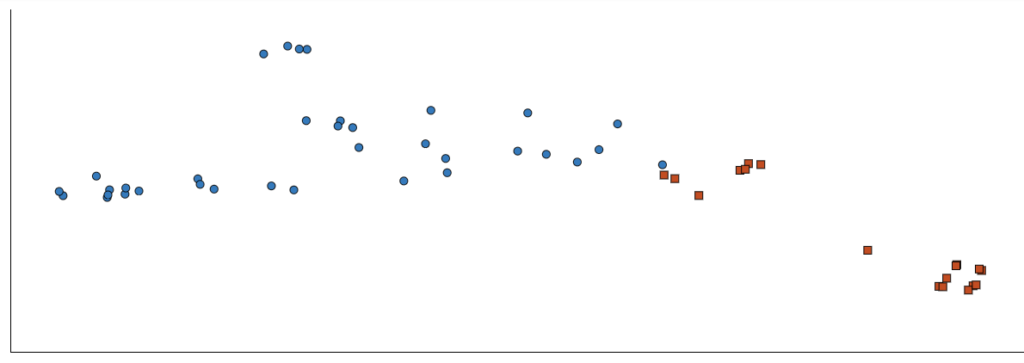
By clicking the “Run” option, you will be able to run the analysis on the given dataset. I have run a basic analysis on my dataset. Now, I will show you how the output of the analysis can be better understood and utilised to the best extent. This is the initial output of my first run with two clusters.
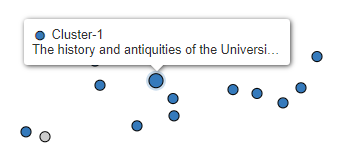
Please note that GDSL does not tell you what the y-axis or x-axis is but there are ways you can understand the output in a more comprehensive manner. The very first thing to do is to just manually compare and contrast the data points available in the two clusters. I attempted to do this with the clusters I generated. I saw that cluster 2 (the orange cluster) contained more philosophical works whereas cluster 1 (blue cluster) contained more general works such as history, literature and news. This gives me a general idea of what the x-axis (or perhaps the y-axis) might mean for this graph. The higher the x value, the more philosophical the work might be.
Another good way to understand the output is to increase the number of clusters. You can change the cleaning configuration and No. of clusters of the tool by going to Document Clustering > Tool Setup (grey toolbar on left) > Cleaning Configuration/Number of Clusters. Below is the setup I used for my second test run. Rather than using 2 clusters only, I used 3 clusters.
The graph generated for 3 clusters looked like this:
Given this cluster, I aimed to find out the main difference between the three clusters. I found out that the third cluster in this graph only included magazines. The second cluster also included magazines (but more of an academic nature rather than literati nature).
In addition to this, you can also revise your dataset and search for terms in them. This can also help you find out what are the classifications being made in the clusters. It would not always be obvious what the cluster contains but a close look and analysis can provide more information.
Hello! My name is Tonushree and I’m a senior from Mumbai, India. I am majoring in Cognitive Science with a Digital Arts and Humanities minor. When I’m not studying/working, I love creating art, exploring various nooks and crannies of campus and Northfield with my friends, and getting coffee with someone different every week to keep me on my toes. I also enjoy acting in Carleton productions. Apart from being a Digital Humanities Associate, I am also a Costume Shop Assistant at the Theater and Dance department and an Office Assistant for the Psych and Cog-Sci department!
Here is a picture of me soaking up the sun during my study abroad, Studio Art in the South Pacific 🙂
I thrive in settings of interdisciplinarity, where a project, theory, or concept needs to be understood from several different lenses, be it philosophical, sociological, economical, linguistic, or digital to name a few. I’m excited by the fact that being a DHA gives me the opportunity to simultaneously dabble in multiple humanities classes and work on or observe the digitization of their projects. I would love to further my interests in art, storytelling and creative visualization by learning how to turn them into digital projects during my time as a DHA!